Posts

Showing posts with the label google

Google Wallet is simplifying clocking in at work
Image
  Google Wallet is evolving into a digital wallet that can store various physical documents like government IDs, event tickets, and boarding passes, making it a convenient replacement for carrying around physical cards or paper. Recent updates to Google Wallet have expanded support for government IDs to new states, added features like easier tap-to-pay and pass sharing, and now allow users to add their employee ID cards to the app. The ability to digitize workplace ID cards could eliminate the need for lanyards and make it easier for employees to access certain facilities or areas of the office, while still maintaining privacy and data security for the enterprise. Google Wallet is evolving into a convenient replacement for your actual wallet, transforming your smartphone into a receptacle for digital IDs, currency, bank cards, tickets, and other passes. The app’s developers have been on a streak, with new features or news of their expanding availability streaming in regularly. No...

10 Google maps settings you probably didn’t know existed

Image
  Google Maps continues to get new features and updates more often than you’d think, and if you haven’t been paying attention, you might have missed a number of changes that can make getting around a lot easier. Here we’re going to focus on 10 newish settings that enable you to do even more with Google Maps. If you’ve been using another mapping app, you might want to jump back in to put these tips to work. The features we’ve included here are for the Google Maps apps on Android and iOS, unless otherwise stated. 1. Set your dietary requirements When you’re searching for local restaurants, you want to see ones that match your own particular dietary requirements (assuming businesses have provided this information to Google). Tap your profile icon (top right) in the mobile app, then choose Settings, Manage your preferences, and Dietary. This leads to a list (including gluten free and vegan) where you can make your selections. Tap Update preferences to confirm your choices. 2. View area...

New options for removing your personally identifiable information from Search

Image
  Privacy and online safety go hand in hand. And when you’re using the internet, it’s important to have control over how your sensitive, personally identifiable information can be found. On Google Search, we already have a set of policies that allow people to request the removal of certain content from Search, with a focus on highly personal content that, if public, can cause direct harm to people. But the internet is always evolving – with information popping up in unexpected places and being used in new ways — so our policies and protections need to evolve, too. Open access to information is a key goal of Search, but so is empowering people with the tools they need to protect themselves and keep their sensitive, personally identifiable information private. That’s why we’re updating our policies to help people take more control of their online presence in Search. Request the removal of personally identifiable information that appears in Google Search For many years, people have b...

New Chrome “Privacy Guide” Takes the Confusion Out of Your Privacy Settings

Image
In an effort to make web privacy easier and more intuitive, Google is rolling out a new “Privacy Guide” for Chrome. This feature, which will slowly roll out to Chrome version M100 users, lets you quickly review all of your privacy and security controls (and learn how they work) without a bunch of scrolling. Privacy guide is just the latest step in simplifying Chrome’s privacy settings. In recent years, Google has reorganized Chrome’s settings to make privacy more intuitive and give you quick access to common controls, like clearing your browser history or cookies. To access Privacy Guide, simply click the three-dot menu in the top right corner of Chrome and select “Settings.” Then, navigate to the “Privacy and Security” tab. You should see the Privacy Guide option under “Clear Browsing Data.” Notably, Privacy Guide ends with two outgoing links. The first lets you try Privacy Sandbox, which is Google’s much-maligned and severely delayed alternative to cookies. And the second link, which...

Sony's Android 12 update includes a welcome change you'll probably never see

Image
  Quick settings that are actually quick Android 12 is Google's most significant transformation to its mobile operating system since Material Design first debuted in 2014. Unfortunately, not every change has been for the better. The quick settings menu got a new Internet tile, combining all of Android's various Wi-Fi and mobile data options into a single place. Of course, that requires additional taps not found in previous versions, forcing some users to push ADB commands to their phones to restore the previous layout. If you happen to have one of Sony's recent phones, you'll be glad to know its take on Android 12 undoes this change — though, it seems, not entirely on purpose. The Xperia 1 III and Xperia 5 III started getting their respective software updates a couple of weeks ago, with some eagle-eyed users over at the Xperia subreddit managing to spot a big improvement (via XDA Developers). Unlike Pixel devices, Sony's Android 12 update includes separate toggles f...

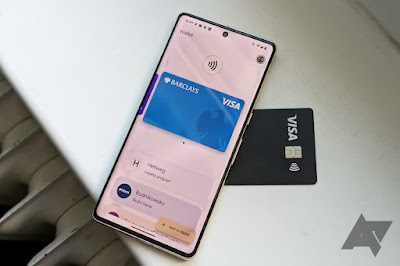
Google Pay UI tweak should make it easier to access NFC cards

Image
 A minor QoL imporvement Google has been improving GPay to offer a more comprehensive digital wallet. The company launched a redesigned app last year and recently expanded its support to more countries. Now, users are getting a new update that makes accessing their NFC payment cards easier. The change delivers a more prominent button for contactless cards at the top of the interface. These cards are commonly used at NFC terminals, so the adjustment makes it more obvious where you can access them. Before now, the button took the form of a tiny and subtle icon that was easier to miss. However, the new one will ensure you find the function at a glance and change things quickly before making an NFC payment. The new GPay design went live in January but has since gained wider adoption, with more users getting the update. To get in on the look, you need to install the latest version of Google Pay. If you have a card already set up, you’ll see a “Ready to pay” button along with icons for N...

Google Messages starts rolling out iMessage reactions, but emoji translations are not quite 1:1

Image
  As we spotted in November and following the latest push for RCS support on iPhone earlier this month, Google Messages is starting to roll out iMessage reactions in beta for Android users. Once rolled out to your Android phone, Google Messages will convert iMessage reactions (officially referred to as “Tapbacks“) sent by iPhone users in response to SMS/MMS. Instead of them appearing as an annoying text version (e.g., Loved “Testing”), the response on your device will appear in the bottom-right corner of the message bubble you sent, similar to the iOS-to-iOS experience. That said, Google made some interesting choices in the translation process. The iMessage “Heart” becomes the “Smiling Face with Heart-Eyes” emoji. Similarly, “Haha” is “Face with Tears of Joy.” The “exclamation marks” become “Face with Open Mouth” and the question mark is “Thinking Face.” Thumbs up/down remains faithful to their iMessage counterparts. Google’s decision to use face emojis rather than symbols might se...

$20 Billion In 2022: Google Pays Apple For Not Launching Its Own Search Engine?

Image
Have you ever wondered why the world’s most valuable company never made any serious attempt to capture a sizeable share of the search engine market, especially in an era when a number of daily search queries are peaking to record high? Yes, we are talking about Apple and its mysterious strategy for not tapping the search engine market currently dominated by Google. If there is any truth in the lawsuit filed recently, it explains how Apple has hands in gloves with Google! Apple has a deal with Google that says it will not develop its own web search engine for as long as Google continues to pay top dollars to keep it as the default search engine within Safari, a new class action claims. Earlier in the week, the lawsuit was filed against Apple, Google, and their respective CEOs in the California court. The lawsuit asserts that the two companies are bound by an agreement to not compete regarding the online search business which is in a direct violation of US antitrust law. In particular, t...

Earn 2GB of Google Drive space for checking your security settings

Image
To properly celebrate  Safer Internet Day , Google is offering a nice perk for users who complete a quick security checkup. If you're willing to make sure your account recovery info is up to date, review recent log-in activity and confirm the list of apps that access your account details, the folks in Mountain View will add 2GB to your total  Drive space . You have to complete the quick process before February 17th, and the extra gigabytes will appear around the end of the month. The offer is only open to personal accounts, though, and while Google Apps for Work and Google Apps for Education users can't boost their space, it's probably not a bad idea to double-check those settings anyway. Link:  https://security.google.com/settings/security/secureaccount

Google Doodle - Venezuela National Day 2015

Image
Venezuela's landscape is an entrancing one. From tropical waters and the Andes in the north, to rich Amazonian forests in the south, the country’s geographic diversity is nothing less than dazzling. No wonder, then, that one of its national symbols is a stunning natural specimen, a microcosm of Venezuela’s kaleidoscopic coloring: the araguaney. Indigenous to the country, this tree’s leaves explode into shades of gold, similar to the bold yellow hue striped across the Venezuelan flag. With today’s Doodle, we celebrate the nature, culture and people that call Venezuela home on this Cinco de Julio, Venezuela’s day of independence.

Get Google's New Material Design Apps, Even If You Don't Have Lollipop

Image
Android: If you thought you had to wait for Lollipop to roll out before you got your hands on Google's new material design releases, you thought wrong. While they might not be available in the Google Play Store just yet, you can download the Maps, Calendar, and Gmail 5.0 APKs now.  Google Maps ,   Calendar , and   Gmail  are all getting big updates, and you can check them out now through these leaked APKs. The best part is that you don't need Lollipop to download them. Gmail requires 4.0, Calendar requires 4.0.3, and to grab Maps you'll need 4.3. From your device, click the download button on each page. When the download is complete you'll be automatically prompted to install the updates with just a couple of taps. APK  Maps 9.0.0 (Android 4.3+) APK  Calendar 5.0-1554015 APK  Gmail 5.0 (1556543)